The Payment File solution allows Sage 50 UK customers to use their bank for processing payments through QAP. Eligibility and requirements will differ depending on factors such as your bank's file formats or your vendors' payment methods. Please contact your Customer Success Manager to discuss whether this is the right fit for you.
Payment File Workflow in
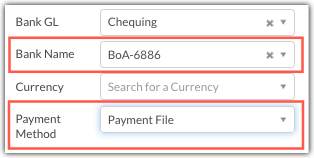
Once onboarded, you can select Payment File as a payment method when creating payments in QAP Please ensure to select the matching Bank Name when coding the payment. Each Bank Name for the Payment File payment method follows the naming convention:
- Banking Institute Name - Last 4 digits of account number
Fully approved Payment File payments are found in the Releases tab. When you click Release Payments, the payments will follow one of two processes depending on your implementation:
- The Payment File is sent directly to your bank. Payments are then processed by your bank to your vendors.
- The Payment File is sent directly to you. Your Customer Success Manager will advise on the best process to receive the file and how to transmit it to your bank.
The payment file contains payment instructions for your bank to determine the payer, the payee, and the payment details. The payment will be deposited directly into the recipient’s bank account.
If a Payment File payment needs to be voided, supporting documentation from your bank of either funds returned or transaction error must be provided.
Was this article helpful?
That’s Great!
Thank you for your feedback
Sorry! We couldn't be helpful
Thank you for your feedback
Feedback sent
We appreciate your effort and will try to fix the article