Purchase Order Approvers and Super Approvers can see all purchase orders currently waiting on their approval in the Pending Approval tab. In the Pending Approval tab, purchase orders can be:
- Approved
- Rejected
- Approved or rejected in batches
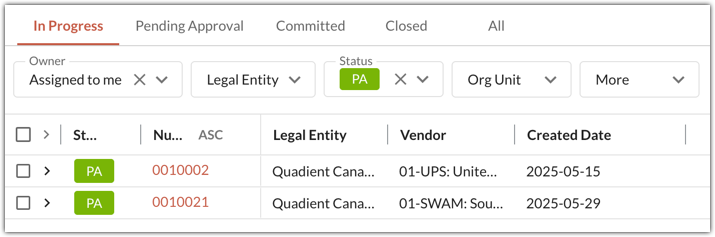
View Pending Approval Purchase Orders
Users will only see purchase orders in the Pending Approval tab if they:
- Have the purchase order approver role.
- Have purchase orders pending their approval.

Other users can view pending approval purchase orders by filtering by Pending Approval status in the In Progress or All tabs.
Approving Purchase Orders
To approve a purchase order:
- Click into the purchase order details view.
- Review the coding.
- Click Approve. Click on the arrow icon beside Approve to use the Approve with a comment feature. This allows you to leave a comment alongside your approval.
Users with the Super Approver role can make some coding changes to the purchase order while it is in Pending Approval status. You can learn more about the Super Approver role here.

If you are the only approver, the purchase order moves to Purchase Order status in the Committed tab. At this point, the purchase order can be matched to invoices. If there are multiple approvers in the workflow, the purchase order will stay in Pending Approval status until approved by all approvers. Click on the thumb icon to see who else needs to approve the purchase order.

Rejecting Purchase Orders
To reject a purchase order:
- Click into the purchase order details view.
- Review the coding.
- Click Reject.

You must leave a comment when rejecting the purchase order to explain why it was rejected. The purchase order moves back to the In Progress tab in Rejected status.

Batch Approving or Rejecting Purchase Orders
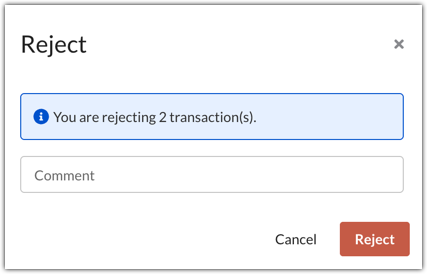
In the tab view, purchase orders can be approved or rejected in batches. To do this:
Select multiple purchase orders.
Click Approve or Reject to approve or reject all selected purchase orders.

When rejecting purchase orders in batches, the same comment will be left on all purchase orders.
Was this article helpful?
That’s Great!
Thank you for your feedback
Sorry! We couldn't be helpful
Thank you for your feedback
Feedback sent
We appreciate your effort and will try to fix the article