Contains options for configuring and managing vendors. Here you can:
- View vendor information.
- View vendor SmartCapture settings.
- Configure vendor payment methods.
Note: Vendor settings are transitioning from List Management to Vendors. If you do not have access to the Vendors tab yet, you can access all vendor-related settings in List Management.
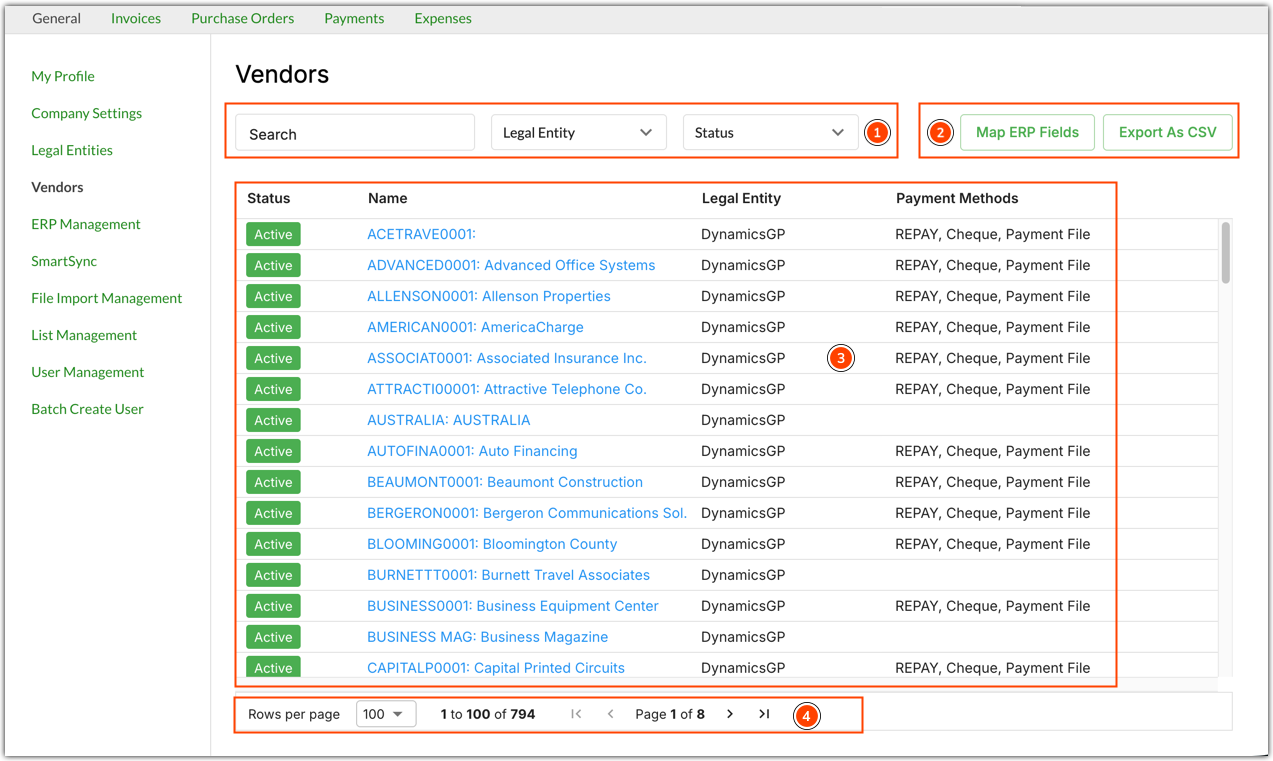
The Vendors screen contains the following options:
- Search bar and options to filter vendors by legal entity and active status. By default, all vendors for all legal entities are displayed.
- Options for managing vendor address mapping and exporting vendor information in CSV format.
- Vendor information:
- Status - Whether the vendor is active or inactive.
- Name - Vendor name. Click on the vendor name to view and configure the vendor's Profile, Invoices, and Payment Methods.
- Legal Entity - The legal entity the vendor belongs to.
- Payment Methods - The payment methods enabled for the vendor.
- Navigation and display options.
Was this article helpful?
That’s Great!
Thank you for your feedback
Sorry! We couldn't be helpful
Thank you for your feedback
Feedback sent
We appreciate your effort and will try to fix the article