Once an invoice is submitted for approval in QAP, the coding can not be changed. Users with the Invoice Coder, Invoice Administrator, and System Administrator can reset their own invoices. Invoice Administrators and System Administrators can additionally reset any invoices they have access to.
The following invoice statuses are considered non-editable, and the invoice must be reset to make any coding changes:
- Pending Approval (PA)
- Approved (A)
- Exported (EX)
- Sync Error (SE)
By default, invoices in Pending Approval (PA) status are non-editable, but users with the Super Approver role can make some coding changes. Learn more about the Super Approver role here.
Resetting Invoices
To do this:
- Open the invoice details view.
- Click Actions and select Reset Invoice.

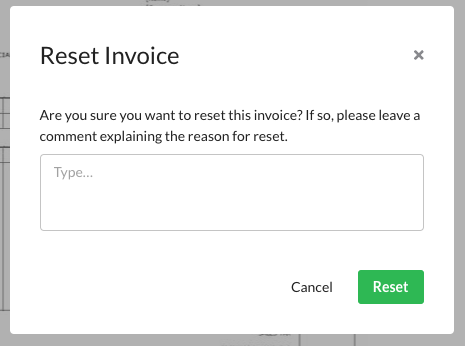
A comment must be left explaining why the invoice is being reset. Enter the reason in the comment box, and click Reset to complete the action.
Was this article helpful?
That’s Great!
Thank you for your feedback
Sorry! We couldn't be helpful
Thank you for your feedback
Feedback sent
We appreciate your effort and will try to fix the article