All applicable vendors will be enrolled for REPAY during your onboarding process. Applicable vendors are vendors that are active and have the following information in QAP:
- Name
- Street
- City
- State/Province
- Zip/Postal Code
- Country
- Phone Number
If any of this information is missing, ensure that it is added to the vendor in your ERP and then run a sync with QAP.
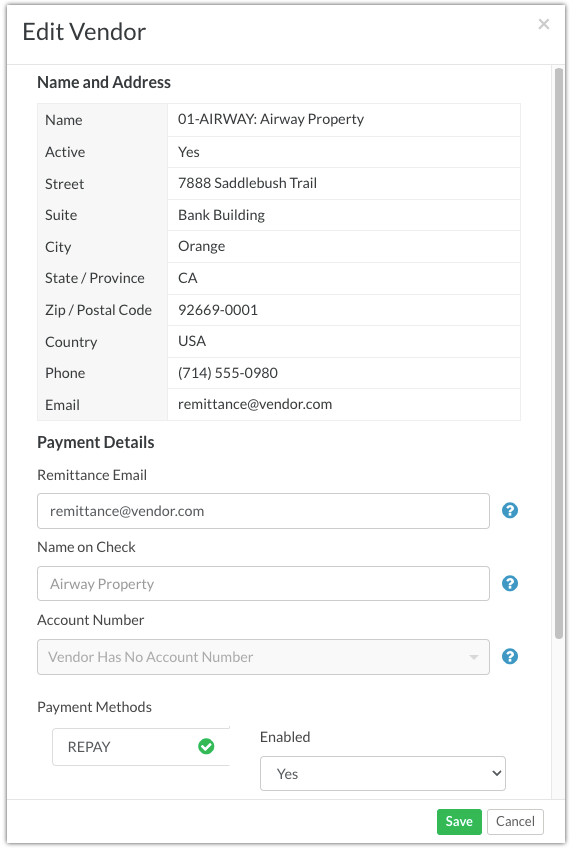
Enrolling New Vendors to REPAY
Any new vendors synced into QAP will be automatically enrolled with REPAY, so long as they meet the above criteria. REPAY will reach out to the vendor when their first payment is released to enroll them in ACH or VCC. If the vendor declines or can't be reached, they will be paid via print cheque.
Name on Check Field
Please note that the Name on Check field is not used by REPAY. REPAY only reads the Name field from the vendor details.
Vendor Name Updates
REPAY can not change a vendor's name once they are registered in their system. If a vendor changes their name, please create a new vendor in your ERP.
Was this article helpful?
That’s Great!
Thank you for your feedback
Sorry! We couldn't be helpful
Thank you for your feedback
Feedback sent
We appreciate your effort and will try to fix the article