Note: Vendor settings are transitioning from List Management to Vendors. If you do not have access to the Vendors tab yet, you can access all vendor-related settings in List Management.
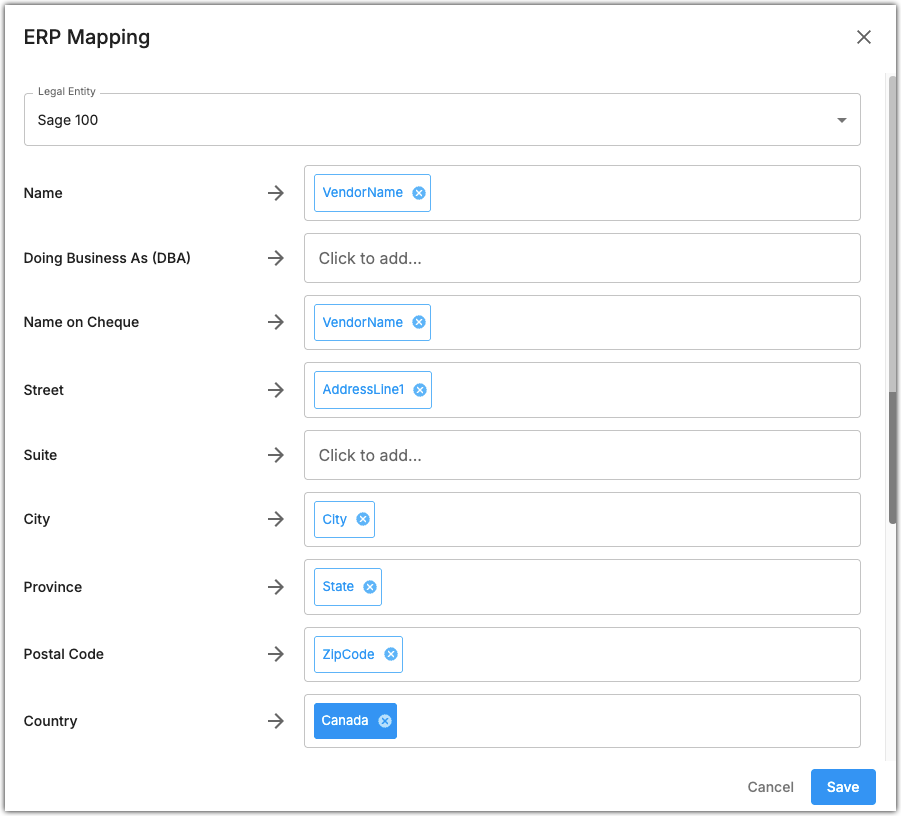
Click Map ERP Fields and select a legal entity to open the vendor information mapping dialog.

Here you can change which fields are used for vendor addresses. The default values are set based on your ERP system. Click on a field to select a value from the ERP system, or enter a custom value.
In this example for the Sage 100 legal entity, all vendor addresses are mapped using information from the ERP system except for the Country field. The Country field is set as Canada for all vendors.
Was this article helpful?
That’s Great!
Thank you for your feedback
Sorry! We couldn't be helpful
Thank you for your feedback
Feedback sent
We appreciate your effort and will try to fix the article