QAP supports importing purchase orders from Sage 100®. Purchase orders can be matched to invoices using two-way matching. The integration has the following parameters:
- Purchase orders use the Standard or Drop-Ship purchase order type.
- The Warehouse list in Sage 100® must be enabled. Follow the steps here to do this.
- Purchase orders are imported in Purchase Order (PO) status by default. To enable importing purchase orders in Pending Approval (PA) status, talk to your Customer Success Manager.
- Purchase orders imported in PA status will go through the approval process in QAP. If no approval channels match the purchase orders, they will not import, and the sync will fail.
- Any updates to the purchase orders must be synced to QAP. For the purchase order approval workflow, the purchase order does not need to be approved again for any updates.
- Receiving data is imported and can be viewed in QAP, but it is not required for matching purchase orders to invoices.
- Freight amounts can be added to invoices as present lines or standard lines. See the Freight section below to learn more.
- Deleting lines from purchase orders synced to QAP will cause invoice sync errors and prevent additional purchase orders from syncing to QAP. Any lines that are no longer needed should be updated to $0.00 in Sage 100®.
Instructions for matching purchase orders to invoices can be found here. QAP follows Sage 100®'s rules for matching purchase orders and invoices. The instructional video below demonstrates how to import and match purchase orders from Sage 100® to invoices in QAP.
Freight Amounts
Freight amounts are imported as part of the purchase order data. Depending on where the amount is coded in Sage 100®, it can be added to the invoice as a:
- Preset line item
- Standard line item
Adding Freight Amounts as a Preset Line Item
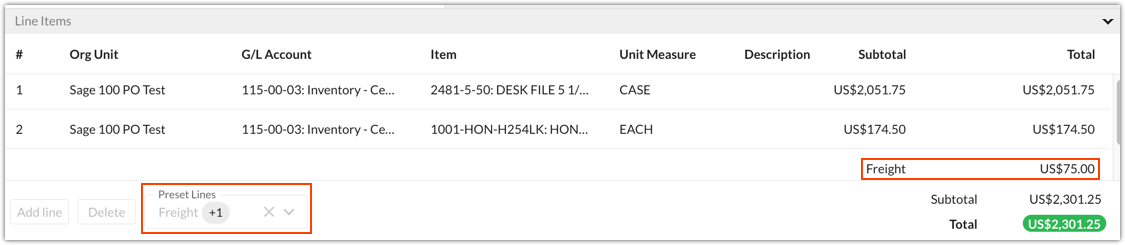
Freight amounts in the Totals tab of Purchase Order Entry are imported to QAP as a preset line item. To code the freight amount:
- Adopt the purchase order lines onto the invoice.
- Select Freight from the Preset Lines menu.
- Code the freight amount.
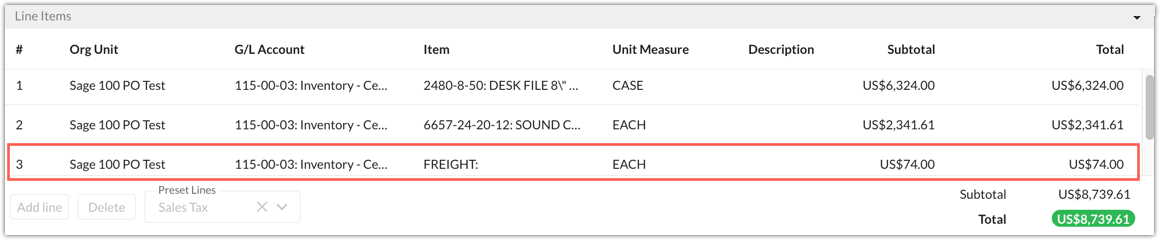
Freight amounts in the Lines tab of Purchase Order Entry are imported to QAP as a standard line item. This means that the lines can be adopted to an invoice as normal.
Was this article helpful?
That’s Great!
Thank you for your feedback
Sorry! We couldn't be helpful
Thank you for your feedback
Feedback sent
We appreciate your effort and will try to fix the article